




Thermaltake Matrix VD2000BNS computer case
May 9, 2007
So I bought a new case, because the old one did not suit me.
What I required:
My requirements were met for example by the case Asus TA250 , I ordered it but it was not available.
Then I discovered the Thermaltake Matrix VD2000BNS which arrived in the end.
Unfortunately I did not have a camera, so I did not photograph anything. Hopefully later on
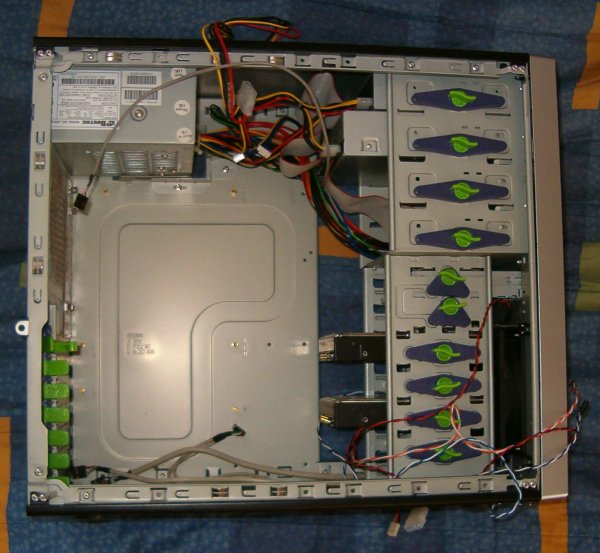
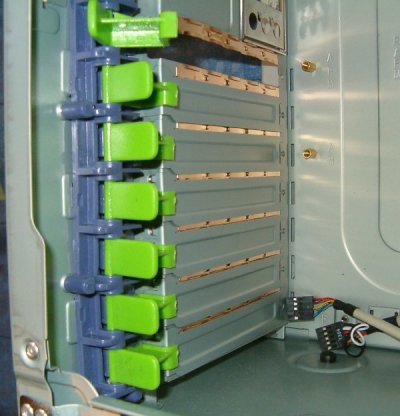
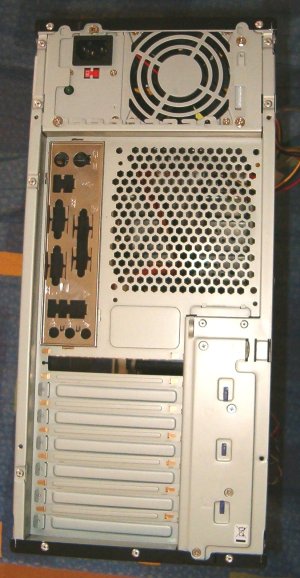
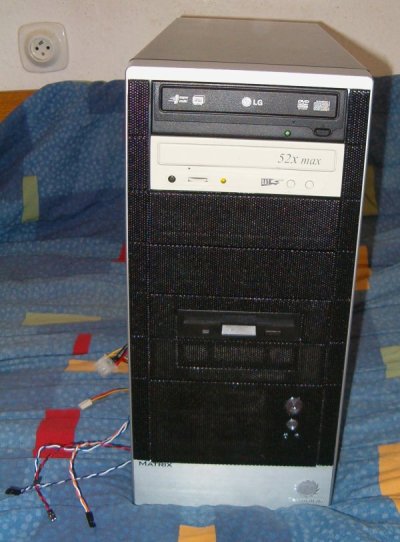
It is a predominantly black case, the front panel is made of a mesh. The components are attached using plastic locks. And from the other side they can also be secured with screws. At the back it has one large low-speed fan, which I moved to the front position in front of the disk. It has connectors for USB, FIREWIRE and audio, but they are on the right-hand side, which is a nuisance, but only if you have the case tucked away somewhere or there is a wall on the right.The left side panel is perforated and removable. To be precise, it has "buttons" for taking it off. On one of them there is a lock like the ones on removable disk trays.
The side panel can also be fastened with two screws with really large heads for tightening by hand. At the back it is also possible to put a classic padlock on the case. :-)
If you do not have anything installed in the 5.25" bays, there is a bar there that stiffens the case. At the front there is the standard power and reset button and two LEDs. The power LED is blue and super bright, the HDD LED is red but does not shine much, it mainly gets lost next to the super bright one. As always I had a problem connecting it - it did not light up - you have to choose the correct polarity.
Together with the case I also bought thermal paste. There was not much of it on the GPU, so after applying it to the chip its temperature dropped considerably. On the CPU the temperature dropped mainly thanks to the better air conditioning.
When replacing the chipset heatsink I photographed the case:
Articles on a similar topic
Lenovo Thinkpad P14s battery life and UEFI/BIOS flashing
Industrial computer IPO ODYSSEE 18WT
Which mouse to choose for my computer?
Samsung S24H850 monitor
TUXEDO Pulse 15 - Gen2
How to connect a computer to a mobile phone running Android
Data backup
Embedded World 2016
Banana Pi R1 case
Computer with MSI B85-G43 motherboard and Intel Xeon E3 1226 processor
Single board ARM computer Banana PI R1
How to use an SSD and TRIM
VDSL internet and the Comtrend VR-3026e modem
Using TouchBook in practice
Compal FL90 and GNU/Linux
ThinkPad 600 with GNU/Linux
Replacing the heatsink on the chipset
Disassembled computer disk
WIFI
HP photosmart 735 digital camera
Newsletter
If you are interested in receiving occasional news by email.
You can register by filling in your email
news subscription.
+